Why shortcut [print screen] key does not always work?
-
This must be because you run your application with elevated privileges (with admin rights) (the UAC must have displayed a popup at startup).
-
For security reasons, Screenpresso can handle shortcuts from Windows running with elevated privileges only when it is installed in Program Files folder.
-
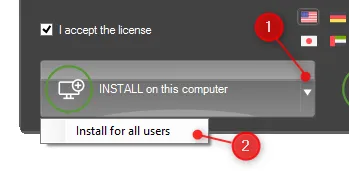
To fix this, you should install Screenpresso in Program Files folder which is not the default behavior:
- Uninstall Screenpresso
- Run again Screenpresso: Right click Screenpresso.exe and select Run as administrator
- Click on the INSTALL on this computer button while holding the Control key or click on the sub-menu Install for all users: