
How to deploy Screenpresso?
This guide is an extract of the complete
Installation
- Screenpresso can be installed using one of the 3 options:
- by the end user via the
user interface - using the command line (for instance using Microsoft SMS). Use the command
Screenpresso.exe deploy --helpto get the option list. - using a MSI installer provided on our
download page
- by the end user via the
- Screenpresso can be installed in
%localappdata%(default) or in%programfiles%folder.
License deployment
Important notes
- When Screenpresso PRO is bought for several users, a single activation key (containing several licenses) is provided by email.
- License per unit can be deployed but each user may have to confirm activation at first launch which is not the case for enterprise license.
- Activation process may require internet connection for License per unit.
Deployment
Manual
- License can be entered manually. Refer to
this guide .
Automatic
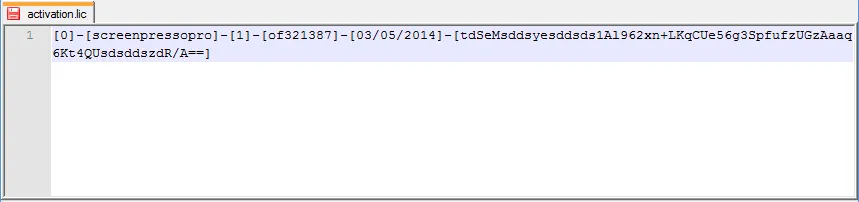
- Create a text file named activation.lic that contains the key you receive by email, for instance:
Option 1: Using the MSI (recommanded)
- Install Screenpresso using the MSI installer (
available here ) - Copy activation.lic where Screenpresso has been installed, next to Screenpresso.exe, either:
%localappdata%\Learnpulse\Screenpresso%programfiles%\Learnpulse\Screenpresso
Option 2: Using the CLI
- Copy activation.lic file next to Screenpresso.exe BEFORE installing on the target machine
- Open a command prompt with administrator privileges and run the command to install:
screenpresso.exe deploy --install --programfiles --quiet
Option 3: Using the user interface
- Copy activation.lic file next to Screenpresso.exe BEFORE installing on the target machine
- Run Screenpresso.exe and click on the Install button